

01 · Image to video
Bring a street-fashion portrait to life
Load a still photo as the first frame and add subtle movement with a slow camera push, keeping the person, outfit and scene layout unchanged. See the video in the output area.

PixVerse V6 is the flagship AI video model PixVerse released on March 30, 2026, built for multi-shot clips with native audio, camera control and expressive characters. On APIMart it is the PixVerse API entry: one endpoint covers text to video, image to video, first/last frame transitions, 1–7 reference images and video extension, at 360p to 1080p for 1–15 seconds, billed per second.
Transparent pricing with no hidden fees. Pay only for what you use.
Featured examples
Pick an example to load the model, prompt and full settings, then adjust it your way.
01 · Image to video
Load a still photo as the first frame and add subtle movement with a slow camera push, keeping the person, outfit and scene layout unchanged. See the video in the output area.
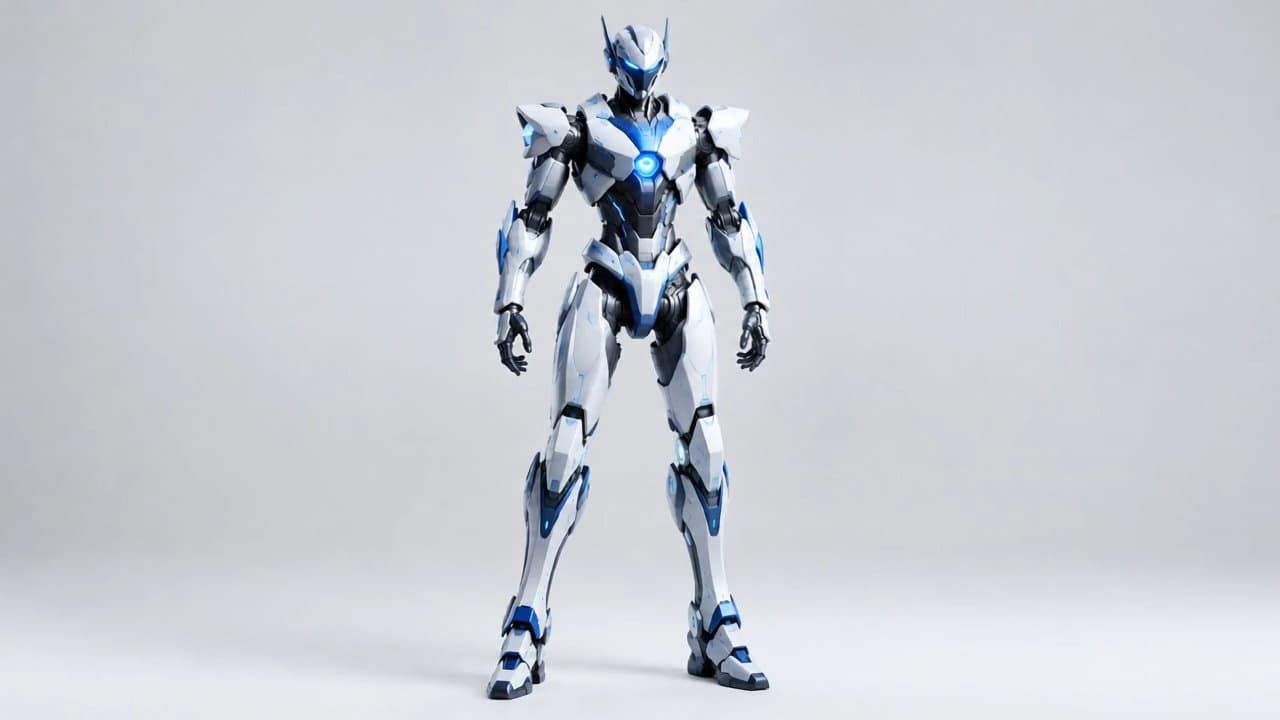
02 · Particle dissolve effect
Load a still of the intact robot as the first frame, keep a recognizable silhouette at first, then let it gradually break into soft blue particles with natural trails and end on an uncluttered frame. See the video in the output area.
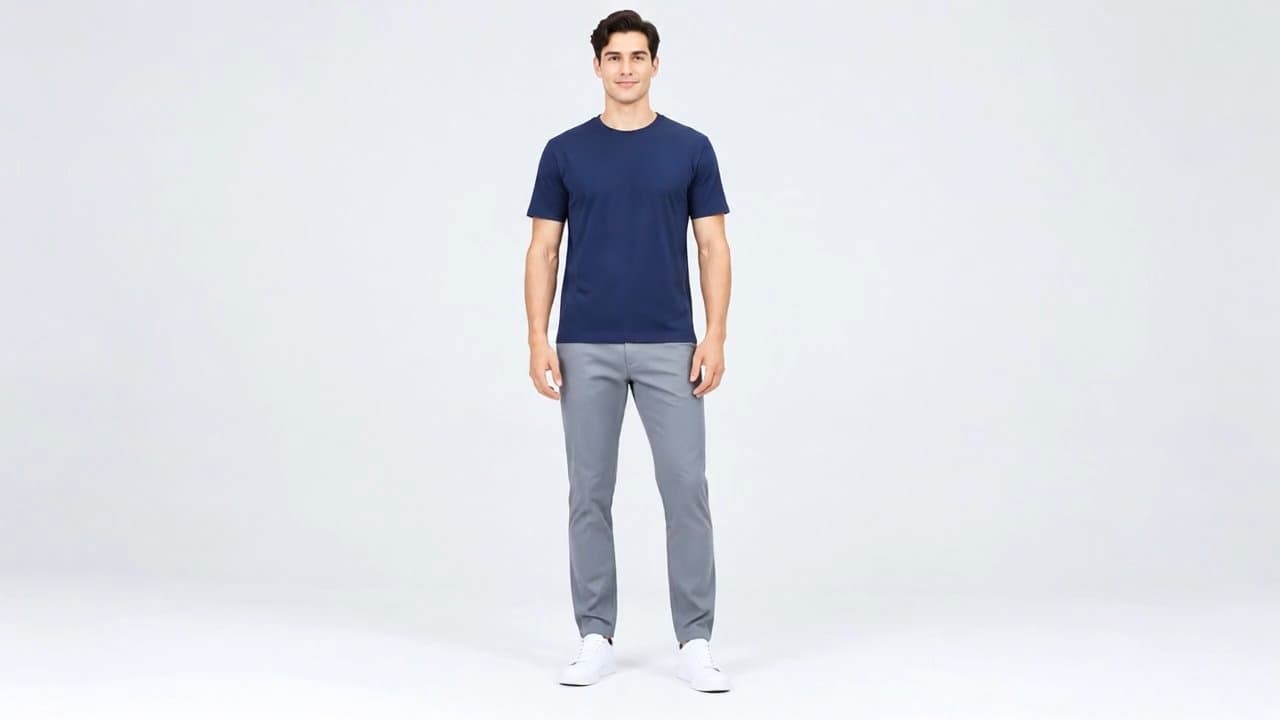
03 · Fun character transformation
Load a full-body photo as the first frame for a playful, friendly superhero transformation: the outfit changes smoothly into an original suit while the person’s face, body proportions and expression stay recognizable, with no existing characters imitated. See the video in the output area.
PixVerse V6 is the latest flagship model from PixVerse. According to PixVerse, it can turn one prompt into a multi-shot short film with native audio, follows camera directions more accurately, keeps character emotion steadier across frames and renders English and Chinese text more cleanly. The APIMart PixVerse V6 API exposes all five generation modes through POST /v1/videos/generations with model pixverse-v6: send a prompt, then add an image, a first and last frame, reference images or a previous task ID to switch modes. Turn on audio and multi-clip output with one field each, and pay only for the seconds you generate.
Call pixverse-v6 with one POST request. Generation is asynchronous: submit a task, then poll the task endpoint for the video URL.
Save your key in the APIMART_API_KEY environment variable and send it as Authorization: Bearer <key> on every request.
POST /v1/videos/generations with model pixverse-v6 and your prompt. Add image_urls, first_frame_image and last_frame_image, img_references or extend_from_task_id to switch modes. The example.com URLs are placeholders. The task ID is in data[0].task_id.
Poll GET /v1/tasks/{task_id} until status is completed, then read the video URL from data.result.videos[0].url[0]. APIMart keeps results for 72 hours, so download the videos you want to keep.
See the PixVerse V6 API reference for every mode, limit and error code.
curl -X POST https://api.apimart.ai/v1/videos/generations \
  -H "Authorization: Bearer $APIMART_API_KEY" \
  -H "Content-Type: application/json" \
  -d '{
    "model": "pixverse-v6",
    "prompt": "A skateboarder races down a coastal road at sunset: wide drone shot, then close-up of the wheels, then a slow-motion jump, wind and wheel sounds",
    "duration": 8,
    "resolution": "1080p",
    "size": "16:9",
    "audio": true,
    "generate_multi_clip_switch": true
  }'
import os
import time
import requests
API_BASE = "https://api.apimart.ai"
headers = {"Authorization": f"Bearer {os.environ['APIMART_API_KEY']}"}
# 1. Submit the generation task
payload = {
"model": "pixverse-v6",
"prompt": "A skateboarder races down a coastal road at sunset: wide drone shot, then close-up of the wheels, then a slow-motion jump, wind and wheel sounds",
"duration": 8,
"resolution": "1080p",
"size": "16:9",
"audio": True,
"generate_multi_clip_switch": True
}
resp = requests.post(f"{API_BASE}/v1/videos/generations", headers=headers, json=payload, timeout=60)
resp.raise_for_status()
task_id = resp.json()["data"][0]["task_id"]
# 2. Poll the task until it finishes
for _ in range(200):
task_resp = requests.get(f"{API_BASE}/v1/tasks/{task_id}", headers=headers, timeout=30)
task_resp.raise_for_status()
task = task_resp.json()["data"]
if task["status"] == "completed":
print(task["result"]["videos"][0]["url"][0])
break
if task["status"] == "failed":
raise RuntimeError(task.get("error", {}).get("message", "generation failed"))
time.sleep(10)
else:
raise TimeoutError(f"task {task_id} did not finish in time; continue GET polling with this task ID")curl -X POST https://api.apimart.ai/v1/videos/generations \
-H "Authorization: Bearer $APIMART_API_KEY" \
-H "Content-Type: application/json" \
-d '{
"model": "pixverse-v6",
"prompt": "The closed flower bud slowly opens into full bloom as morning light rises",
"first_frame_image": "https://example.com/first-frame.jpg",
"last_frame_image": "https://example.com/last-frame.jpg",
"duration": 5,
"resolution": "720p"
}'TASK_ID="task_xxx" # replace with the task_id returned by the POST request
curl "https://api.apimart.ai/v1/tasks/$TASK_ID" \
-H "Authorization: Bearer $APIMART_API_KEY"| Parameter | Type | Required | Default | Description |
|---|---|---|---|---|
model | string | Required | Default: pixverse-v6 | Always pixverse-v6. |
prompt | string | Required | Default: — | Up to 5,000 characters, required in every mode. |
resolution | string | Optional | Default: 540p | 360p, 540p, 720p or 1080p. |
duration | integer | Optional | Default: 5 | 1–15 seconds. Transitions accept only 5 or 8. |
size | string | Optional | Default: 16:9 | 16:9, 4:3, 1:1, 3:4, 9:16, 2:3, 3:2 or 21:9. Used in text-to-video and fusion modes. |
audio | boolean | Optional | Default: false | true adds a generated soundtrack and uses the audio rate. |
generate_multi_clip_switch | boolean | Optional | Default: false | true returns a multi-shot continuous video. Text and image to video only. |
image_urls | string[] | Optional | Default: — | Image to video: public image URL; only the first image is used. |
first_frame_image | string | Optional | Default: — | Transition: first frame URL. Send together with last_frame_image. |
last_frame_image | string | Optional | Default: — | Transition: last frame URL. Send together with first_frame_image. |
img_references | string[] | Optional | Default: — | Multi-reference fusion: 1–7 public image URLs. |
extend_from_task_id | string | Optional | Default: — | Video extension: ID of one of your completed pixverse-v6 tasks. |
negative_prompt | string | Optional | Default: — | What to avoid, up to 2,048 characters. |
seed | integer | Optional | Default: 0 | 0–2147483647. The same prompt and seed give similar results. |
watermark | boolean | Optional | Default: false | true adds a watermark in the bottom-right corner. |
nsfw_check | boolean | Optional | Default: false | Screen the prompt and input images with omni-moderation-latest before submission. |
Both PixVerse models on APIMart use one endpoint and one API key. Pick V6 for every mode and the lowest rate, or V6 Max for text and single-image video, and compare live per-second prices on each page.
| Model | Best for | Resolution | Duration |
|---|---|---|---|
| PixVerse V6 APIThis page | Five modes: text, image, first/last frame, 1–7 references and extend; multi-shot and negative prompts | 360p–1080p | 1–15 s |
| PixVerse V6 Max API | Text and single-image video only, at a higher per-second rate | 360p–1080p | 1–15 s |
Guides, comparisons and pricing analysis from the APIMart blog.
What the pixverse-v6 endpoint on APIMart supports
Prompt only for text to video, image_urls for image to video, first_frame_image plus last_frame_image for transitions, img_references for multi-reference fusion, or extend_from_task_id to continue a clip.
Set generate_multi_clip_switch to true in text or image to video to get a continuous video made of several shots from one request.
Set audio to true to add a generated soundtrack. Silent video is the default and costs less per second.
Pass 1–7 images in img_references to blend characters, products or styles into one new scene described by the prompt.
Animate from a first frame to a last frame in 5 or 8 seconds, or extend one of your completed pixverse-v6 tasks into a longer story.
Choose 360p, 540p (default), 720p or 1080p and any length from 1 to 15 seconds. Text and fusion modes support 16:9, 4:3, 1:1, 3:4, 9:16, 2:3, 3:2 and 21:9.
Write up to 5,000 characters of direction and up to 2,048 characters of negative_prompt. Use seed to make similar results easier to reproduce.
Gold members pay from $0.016 per second at 360p silent to $0.08 per second at 1080p with audio. No watermark by default and no subscription.
Where multi-shot video with sound helps
Generate multi-shot product and brand spots with sound from one prompt, then render 9:16 and 16:9 versions for each channel.
Draft scenes with cuts, camera moves and audio in one pass, then extend the best clip to continue the story.
Animate a product photo, or fuse product and model references into lifestyle clips for stores and marketplaces.
Produce vertical clips for Reels, Shorts and TikTok at 540p or 720p for low cost, and keep 1080p for final posts.
Keep a character consistent with reference images while the prompt directs emotion, action and camera framing.
Create smooth morphs between a first and last frame for intros, reveals and before-and-after visuals.
Create an account, write your prompt and call pixverse-v6
Create an APIMart account and generate a PixVerse V6 API key to access PixVerse V6 API through the unified video generation endpoint.
Draft a PixVerse V6 prompt with subject, action, scene, physical motion, camera language, lighting, style, and mood. Then choose duration, resolution, and size for the generated clip.
Call PixVerse V6 API with model set to pixverse-v6, submit your prompt and settings, then poll the task status endpoint to retrieve the final cinematic AI video.
What creative teams and developers say about the PixVerse V6 API
PixVerse V6 gives our creative team a fast way to test cinematic campaign scenes before production. The APIMart workflow is easy to automate.
We use pixverse v6 for social video concepts, product storyboards, and character visuals. Prompt iteration is quick, and task polling fits our internal tools.
The PixVerse V6 API page makes the PixVerse V6 request structure clear for developers. Model, prompt, duration, resolution, and size are straightforward to wire up.
For early video direction, PixVerse V6 helps us align on motion, mood, framing, and visual style without waiting for a full production pass.
APIMart lets us test pixverse v6 through the same gateway and billing pattern we already use for PixVerse V6 and other AI video models.
PixVerse V6 is practical for prototypes and structured enough for production API experiments, especially when paired with APIMart task tracking.
Modes, pricing, audio, multi-shot and the V6 Max comparison
The PixVerse V6 API gives developers programmatic access to PixVerse V6, the flagship video model from PixVerse. On APIMart you call it with model pixverse-v6 through POST /v1/videos/generations and poll GET /v1/tasks/{task_id} for the video. The same APIMart API key works for every other model on the platform. PixVerse V6 is also searched as PixVerse AI V6 or Pix Verse V6; these all refer to the same model.
PixVerse announced V6 on March 30, 2026. PixVerse highlights multi-shot short films with native audio from a single prompt, more accurate camera control, steadier character emotion, more realistic physical interactions and cleaner English and Chinese text in the video.
Five: text to video (prompt only), image to video (image_urls; only the first image is used), first/last frame transition (first_frame_image and last_frame_image together), multi-reference fusion (img_references, 1–7 images) and video extension (extend_from_task_id). A prompt of up to 5,000 characters is required in every mode.
Set generate_multi_clip_switch to true in a text-to-video or image-to-video request. PixVerse V6 then returns one continuous video made of several connected shots. Describe the shots or story beats in your prompt.
Yes, when you set audio to true. The default is silent video. With audio on, the request is billed at the audio rate for the chosen resolution.
Gold members pay per second: 360p $0.016 ($0.024 with audio), 540p $0.024 ($0.032), 720p $0.032 ($0.04) and 1080p $0.064 ($0.08), as of November 2026. A 5-second 1080p clip with audio costs $0.40. Platinum and Diamond members pay less, failed tasks are not charged, and the pricing table on this page shows current rates.
Yes. PixVerse app plans sell monthly credits for its website and apps. The APIMart PixVerse V6 API has no subscription: you top up a balance and pay per second of generated video, with the same key for all models.
Resolution 360p, 540p (default), 720p or 1080p; duration 1–15 seconds (default 5; transitions only 5 or 8). size accepts 16:9, 4:3, 1:1, 3:4, 9:16, 2:3, 3:2 and 21:9 in text-to-video and fusion modes; image and transition modes follow the input images.
For a transition, send first_frame_image and last_frame_image with a prompt and a duration of 5 or 8 seconds. To extend, send extend_from_task_id with the ID of one of your completed pixverse-v6 tasks plus a prompt for what happens next.
PixVerse V6 Max (model pixverse-v6-max) covers text to video and single-image video only, without transitions, multi-reference fusion, extension, multi-shot or negative prompts, and costs more per second (1080p $0.0782 versus $0.064 for Gold members). Use V6 for the full set of modes.
Sign up for APIMart, add funds and create a key on the API Keys page. Send it as Authorization: Bearer <key>. The same key calls pixverse-v6, pixverse-v6-max and every other model on APIMart. The PixVerse V6 API is not free: signing up costs nothing, but each generation is paid per second from your balance, with no subscription.
APIMart keeps generated videos for 72 hours, so download the files you want to keep. watermark defaults to false, so videos have no watermark unless you set it to true.
Explore more models in the same category.
Gemini Omni 1.1 Flash Ext
Omni-Flash-Ext is an extended video generation model in version 4.6.4 of Google's Gemini series.
Kling V2.6 Motion Control
kling-motion-control on APIMart uses a reference image plus a reference video to transfer subject motion into generated clips. Add an optional prompt, choose character orientation and mode, and control sound or watermark settings for kling motion workflows.
Kling V3 Motion Control
kling-motion-control on APIMart uses a reference image plus a reference video to transfer subject motion into generated clips. Add an optional prompt, choose character orientation and mode, and control sound or watermark settings for kling motion workflows.

HappyHorse
HappyHorse-1.0 is an AI model that generates videos based on text input.